Git은 분산형 버전 관리 시스템(Version Control System)의 한 종류
자세한 유래와 내용은 다음에 정리하고, 필요한 개념 및 사용법에 대해 정리하겠습니다.
Git 기본 용어
- Repository: 저장소
- Working Tree: 저장소를 어느 한 시점을 바라보는 작업자의 현재 시점
- Staging Area : 저장소에 커밋하기 전에 커밋을 준비하는 위치
- Commit: 현재 변경된 작업 상태를 점검 마치면 확정하고 저장소에 저장하는 작업
- Head : 현재 작업중인 Branch
- Branch : 가지 또는 분기점을 의미하며, 작업을 할때에 현재 상태를 복사하여 Branch에서 작업을 한 후에 Merge를 하여 작업
Nerge: 다른 Branch의 내용을 현재 Branch로 가져와 합치는 작업
Git 주요 명령어
- git init : 깃 저장소 초기화
- git help : 명령어를 잊어버린 경우, 가장 많이 사용하는 깃 명령어들이 나타난다.
- git status : 저장소 상태 체크
- git clone : 저장소를 내 local에 복사
- git add : 저장소에 파일 추가 X, git -> file 을 지켜보게 된다.
- git commit : 수정 작업이 끝났을 때 마침을 알리는 작업
- git push : local -> repo
- git pull : repo -> local
- git log : commit log 확인
- git branch : 새로운 독립적인 공간(branch)를 만든다.
- git checkout : 독립된 작업 공간인 브랜치를 자유롭게 이동할 수 있다.
- git merge : master 브랜치로 병합
Git 작업 개념(위치별)
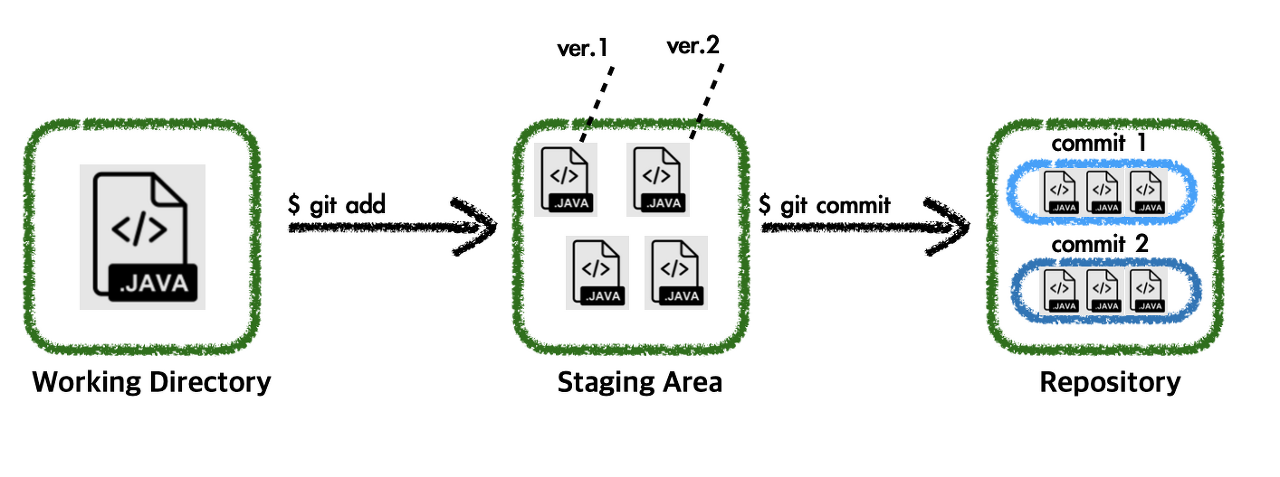
- Working Directory
: 내가 작업하고 있는 project directory
- Staging Area
: commit을 하기 위해 add 한 파일들이 모여있는 공간
- Repository
: commit들이 모여있는 저장소
Git 작업 개념(File 관점)

- Untracked
: Working Directory에 있는 파일, Git으로 버전관리 하지 않은 상태
- Unmodified
: 신규로 파일 추가되었을 때, git add 상태
- Modified
: 파일이 추가된 이후 해당 파일이 수정되었을 때의 상태
- Staged
: Staging Area에 반영된 상태
Git Practice
$ git init
Initialized empty Git repository in C:/Users/multicampus/Desktop/test/.git/esktop/test/.git/

$ touch test.txt

$ git status
On branch master

No commits yet

Untracked files:
  (use "git add <file>..." to include in what will be committed)
        test.txt

nothing added to commit but untracked files present (use "git add" to track)
git add .
$ git status
On branch master
No commits yet
Changes to be committed:
(use "git rm --cached <file>..." to unstage)
new file: test.txtstaging area에 test.txt file이 올라온 상태.
$ git rm --cached test.txt
rm 'test.txt'

$ git status
On branch master

No commits yet

Untracked files:
  (use "git add <file>..." to include in what will be committed)
        test.txt

nothing added to commit but untracked files present (use "git add" to track)
다시 working directory로 내려온다.
$ git add .

$ git commit -m "first commit"
[master (root-commit) 960c753] first commit
 1 file changed, 0 insertions(+), 0 deletions(-)
 create mode 100644 test.txt

 $ git status
On branch master
nothing to commit, working tree clean

$ git log --oneline
960c753 (HEAD -> master) first commit
추후 내용 추가할 예정